


Google Ads Offline Conversion Tracking in 2026: What Changed and What to Do
Level up your Google Ads strategy by tracking MQLs, SQLs, and closed deals with offline conversion tracking. Learn to integrate offline data for better insights.
Table of contents
- What offline conversion tracking actually does
- What changed for offline conversion tracking in 2026
- Is GCLID being deprecated?
- How does offline conversion tracking work?
- How to set up offline conversion tracking in 2026
- Setup by CRM: HubSpot, Salesforce, Zapier
- Set up the funnel, not just the finish line
- Why you start new conversions as Secondary
- Resetting bidding targets when you switch
- What to do this week
- FAQs
TL;DR
Offline conversion tracking, sending CRM events like MQL, SQL, and Closed Won back into Google Ads so Smart Bidding optimises toward pipeline instead of form fills, still works and still matters. But the setup changed twice in the last year. GCLID-only import is now Google’s legacy path, Enhanced Conversions for Leads is the recommended setup and reports more accurately. The UploadClickConversions API request used by custom integrations is deprecated on 15 June 2026 and must move to the Data Manager API. Data Manager is now the setup hub. If you built this before 2024 and haven’t touched it, audit which path you’re on this week.
Intro to offline conversion tracking
Most B2B SaaS companies running Google Ads optimise toward the wrong thing. They track form fills and call clicks, then let Smart Bidding chase whichever keyword produces the most of them. The keyword that produces the most form fills is rarely the keyword that produces the most pipeline. Offline conversion tracking is how you close that gap – you tell Google which clicks turned into MQLs, SQLs, and closed deals, and the algorithm starts buying more of the clicks that produce revenue instead of the clicks that produce noise.
The concept has not changed in years. The setup has changed twice in the last twelve months, and one of those changes has a deadline. If you set this up before 2024 and have not touched it since, parts of your implementation are now on Google’s legacy path – and if you run a custom API integration, part of it stops working on 15 June 2026.
This is the version of the article that accounts for that.
What offline conversion tracking actually does
Offline conversion tracking measures the events that happen after the click but outside the browser session. For a B2B SaaS company, that is the part of the lifecycle stages that matters:
- Marketing Qualified Lead
- Sales Qualified Lead
- Opportunity created
- Closed Won

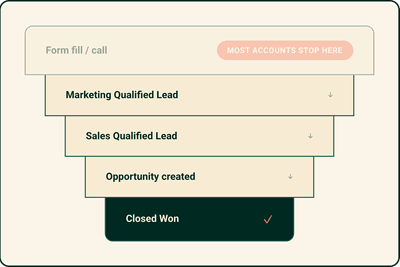
Most accounts only track the first event in that list – the form fill or the call. That is the cheapest signal to capture and the least useful one to optimise toward. A form fill from a student writing a thesis counts the same as a form fill from a VP of Engineering at a 400-person company. Smart Bidding cannot tell the difference unless you tell it.
When you feed the later events back into Google Ads, the algorithm learns which keywords, audiences, devices, times, and creatives produced the leads that became pipeline, not just the leads that became leads. The keyword that looked like it was crushing it because it generated 40 form fills a week often turns out to produce zero SQLs.
Without offline conversion tracking, you would have scaled it.
What changed for offline conversion tracking in 2026
Three things. The first two are the ones that make an old implementation a liability rather than just an outdated one.
GCLID-only is now the legacy path
The original way to do this was to capture the GCLID (Google’s unique click identifier) store it against the lead in your CRM, and push it back to Google when the lead changed stage. That still works. But Google now classifies plain GCLID import as a legacy feature and recommends Enhanced Conversions for Leads instead. Enhanced Conversions for Leads uses the GCLID and hashed first-party data (email, phone) as match keys, so it still attributes conversions when the GCLID is lost, which happens more often than most advertisers think, between cookie consent rejections, redirects that strip the parameter, and mobile form builders.


An example of what GCLID looks like within a URL string
The practical effect: a GCLID-only setup quietly under-reports, and Google’s own diagnostics now flag it as the thing to upgrade.
The old API import is deprecated on 15 June 2026
If your offline conversions are pushed through a custom integration built on the Google Ads API’s UploadClickConversions request, that request is being deprecated on 15 June 2026. Workflows are being moved to the Data Manager API. This affects engineering-built integrations, not standard CRM connectors – but it is worth knowing which one you have, because “we built a script for this in 2022” is exactly the situation that breaks silently. If you are not sure, ask whoever built it whether it calls UploadClickConversions. If it does, it needs to move before the deadline.
Data Manager is now the hub, and the methods have merged
From April 2026, Google Ads accepts user-provided data from website tags, Data Manager, and API connections at the same time, you no longer pick one method and live with it. Existing accounts are being migrated automatically. Google Ads Data Manager is now the front door for setting up or upgrading offline conversions, and it is where GCLID and first-party data get used together as match keys.
If your mental model is still “Tools → Conversions → Import from clicks → upload a CSV”, that model is now one path among several rather than the path.
None of this means offline conversion tracking is going away. The business case is unchanged, and Google is investing in it, not retiring it. What has changed is that the cheap, brittle version is now the legacy version, and the deadline removes the option of ignoring it for the subset of accounts running custom imports.
Is GCLID being deprecated?
No – and this is the question worth answering directly, because the headlines are misleading.
The GCLID itself is not deprecated. It is still the primary match key Google uses to connect a click to a downstream conversion, and Google still recommends sending it wherever you have it.
What is deprecated is one specific method: the UploadClickConversions API request, on 15 June 2026, for custom integrations. Standard CRM connectors and tag-based setups are not affected by that deadline.
Separately – and this is the part that gets conflated – GCLID-only import (no first-party data alongside it) is now treated as legacy and is the thing Google wants you to upgrade away from, not because GCLID stopped working but because GCLID alone leaves attribution on the table every time the parameter is lost.
How does offline conversion tracking work?
It is still worth understanding the GCLID, because it is the thing that connects the click to the deal even under the new setup.
A GCLID is a unique string Google appends to your landing page URL every time someone clicks an ad – as long as auto-tagging is on, which it is by default for any account created after January 2026 and almost certainly on for yours.
It encodes which campaign, ad group, and keyword produced the click. When a lead fills out a form, you capture that GCLID into a hidden field and store it against the contact in your CRM. When that contact later becomes an MQL, SQL, or Closed Won, you send the GCLID back to Google along with the event name, value, and timestamp. Google matches it to the original click and credits the conversion.
Enhanced Conversions for Leads adds a second match key on top of this: hashed first-party data from the form, sent privately and matched to signed-in Google accounts. When the GCLID survives the journey, Google uses it. When it does not, the hashed email can still make the match. You get more complete data and the same attribution logic.
To confirm auto-tagging is on: Settings → Account settings → Auto-tagging → set to Yes. This is the one part of the original setup that has not changed.
How to set up offline conversion tracking in 2026
The right setup depends on your CRM. For most B2B companies, that is HubSpot or Salesforce, and both have direct connections through Data Manager. If you are starting from scratch, start with Enhanced Conversions for Leads, not legacy GCLID import. Google’s own recommendation is now explicit on this, and it is the correct one, there is no reason to build the legacy version in 2026 and then immediately have to upgrade it. Set it up through Data Manager, connect your CRM, and let GCLID and first-party data both run as match keys.
Setup by CRM: HubSpot, Salesforce, Zapier
The path differs by stack. This is the short version of which route applies to you and what to watch for:
| Your situation | Route | Effort | Watch for |
|---|---|---|---|
| Starting from scratch | Enhanced Conversions for Leads via Data Manager | Moderate, one-time | Don’t build the legacy GCLID-only version first, you’ll only have to upgrade it |
| HubSpot (Marketing Hub Pro/Enterprise) | HubSpot ad conversion events → routes through Enhanced Conversions for Leads | Low, self-serve | Enable Enhanced Conversions in Google Ads when prompted; take the “Update to EC” prompt on any legacy events |
| Salesforce Sales Cloud | Data Manager connection with Enhanced Conversions for Leads | Higher — owner of the Salesforce instance, not a self-serve afternoon | Same principle as HubSpot: link accounts, map milestones, send GCLID + first-party data |
| No native connector | Zapier bridge | Low, no-code | Adds latency (minutes, not seconds) and a third-party dependency, fine without engineering resource, poor with it |
| Custom API integration (pre-2024) | Migrate off UploadClickConversions to the Data Manager API |
Engineering work, deadline-bound | Hard deadline of 15 June 2026 confirm whether your stack calls this request |
Two details that do not fit in a table but matter:
For HubSpot, set a consent property deliberately. Google recommends only sending data for contacts who have consented to data sharing with third parties. Create a single checkbox consent property, add it to every form that can convert, and map it in the connection. This is not optional housekeeping in the AU/EU privacy environment – it is the thing that keeps the whole setup defensible.
For the custom-integration row: the deadline only bites if a script in your stack calls UploadClickConversions directly. Standard connectors do not. The failure mode is a script someone built years ago that nobody has looked at since, which is exactly the kind of thing that breaks without anyone noticing until pipeline reporting goes quiet.

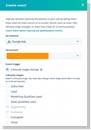
This is what it looks like within Hubspot when you create events for MQLs, SQLs or deal closed.
Set up the funnel, not just the finish line
Do not only send Closed Won. Create a separate conversion action for each stage and assign each a value that reflects its place in the funnel:
- MQL – a low value, enough to give the algorithm an early signal without overweighting it
- SQL – a mid value
- Opportunity – higher
- Closed Won – full deal value
This gives Smart Bidding a graded signal instead of a single sparse one. Closed Won alone is the most accurate signal and the slowest – in a 90-day B2B sales cycle, the algorithm waits a quarter to learn anything. The earlier stages keep it learning in the meantime, weighted so it still knows what actually matters.
Why you start new conversions as Secondary
When you create a new offline conversion action, set it to Secondary, not Primary. The default is Primary, and accepting the default is the most common mistake we see.
A Primary conversion enters your main reporting columns and, more importantly, enters your bidding. If you flip a brand-new SQL conversion straight to Primary, Smart Bidding starts optimising against a signal it has no history for, and delivery gets unstable while it works it out. Run it as Secondary first. The data still collects in the background – you can see it by opening the “All conv.” column and segmenting by conversion action – and Google learns the pattern of which clicks produce the new event without that learning destabilising the campaign. When you later promote it to Primary, you are switching to a signal Google already understands rather than one it is meeting for the first time.

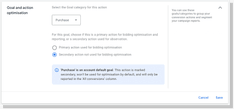
Secondary conversions within Google Ads Conversion setup
Reset your targets when you switch
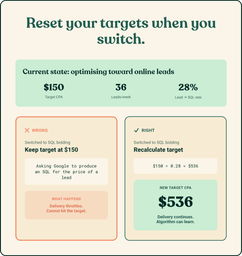
When you do move an offline conversion to Primary, change your bidding targets at the same time.
Suppose you run a Target CPA of $150 optimising toward online leads. You generate 36 leads a week and 10 of them become SQLs – a 28% rate. If you switch the bidding goal to SQLs and leave the target at $150, you are asking Google to produce an SQL for the price of a lead. It cannot, so it throttles delivery to protect the target it can no longer hit. The correct target is roughly the old one divided by the conversion rate – here, around $530. Recalculate it from your own funnel rates before you flip the switch, not after delivery has already collapsed.

What to actually do this week
If you have an existing setup, the order is: confirm whether you are on the legacy GCLID-only path or Enhanced Conversions for Leads; check whether anything in your stack calls the UploadClickConversions API request, because that one has a June deadline; and if you are on legacy, plan the upgrade to Enhanced Conversions for Leads through Data Manager. If you are starting fresh, skip the legacy version entirely and build on Enhanced Conversions for Leads from the start.
The accounts that get this right stop optimising toward cheap leads and start optimising toward pipeline. That is the entire point, and it is still the highest-leverage change available to most B2B SaaS accounts running paid search. The only thing 2026 changed is the setup – and one deadline that decides whether you do it on your schedule or Google’s.
If you want a second pair of eyes on which path your account is on, or help moving off the legacy setup before June, get in touch.
FAQs
For B2B SaaS, it is the single highest-leverage change most accounts can make due to how important signals are for automated bidding and AI campaigns. The argument has not weakened, if anything the case is stronger now that Smart Bidding controls more of the account and feeds on whatever signal you give it. Feed it form fills and it optimises for form fills. The setup got slightly more involved; the return did not get smaller.
Offline conversion import in its original form matches on GCLID alone. Enhanced Conversions for Leads matches on GCLID plus hashed first-party data, so it still attributes the conversion when the GCLID was never captured or got stripped in transit. Same attribution logic, more complete data, and it is the version Google now recommends and actively develops. Treat plain import as the thing you upgrade from, not a parallel option.
Yes. Google explicitly recommends sending the GCLID wherever you have it, even with the tag capturing first-party data. The GCLID is still the strongest match key when it survives. First-party data is the backup that catches the conversions it misses - not a replacement for it.
As a working floor, aim for at least 15 of the conversion you are optimising toward per month before that conversion drives bidding. Below that the algorithm does not have enough signal and behaves erratically. This is the practical reason to start new actions as Secondary and to send earlier funnel stages - they accumulate volume while Closed Won is still too sparse to bid on.
Because in a 90-day sales cycle, Closed Won is both the most accurate signal and the one that arrives a quarter late and in tiny volume. Optimising on it alone means the algorithm is always learning from last quarter's deals at a volume too low to be stable. Also, some sales cycles are longer than the attribution window.



Josh Somerville
Josh is the co-founder of Farsiight and has spent the past 12 years scaling PPC campaigns.
Like what you read?
Learn more about digital, creative and platform strategies below.